AI Agents

AI assistants that answer, prospect, publish, monitor and automate. You approve, they execute.

Your website attracts visitors. The AI agent helps turn them into customers.

An AI assistant installed on your website, available around the clock, that turns visitors into contact requests. It answers from the content of your website and collects requests. In your client area, the AI prepares the content and you approve it: you always stay in control.

24/7
answers, even when closed
1 line
of code to install
1 area
to follow everything
100%
control for you

What the AI agent does

AI chat on your website

It answers questions based on your pages, your information sheets and your instructions, in your company's colours. It is re-read and updated every night.

Qualified contact requests

A customisable form, and an email containing the full conversation and a summary written by the AI.

Email replies

The AI suggests a draft reply, sent from your own address once you have reviewed it.

Web prospecting (option)

Search for target companies with their emails, automatic follow-ups and handling of unsubscriptions.

Social media (option)

The month's posts for LinkedIn, Facebook, Instagram and TikTok, with images if needed, published after your approval.

Tracking

A dashboard and a recap sent by email every Monday.

How it works, in 4 steps

  1. 1

    The visitor asks their question

    At any hour. The assistant answers, then offers a call-back if needed.

  2. 2

    You receive a request ready to handle

    With a summary, the budget, the timeframe and the visitor\'s level of interest.

  3. 3

    You reply within minutes

    Starting from the draft prepared by the AI, which you edit as you see fit.

  4. 4

    The AI also prepares posts and prospecting

    Depending on the plan chosen. Nothing is published or sent without your approval.

The assistant keeps learning

Nightly re-reading of your website, addition of information sheets (FAQs, terms, arguments), spotting of questions left unanswered, and custom instructions, for example “always offer a call-back”.

Frequently asked questions

How is it installed?

The assistant is installed with a single line of code, compatible with WordPress, Wix, Shopify and bespoke websites. We can install it for you.

Does the assistant know my business?

It relies only on the information you provide and does not make up answers. If it does not know, it says so and offers a call-back.

Do we stay in control?

Yes. Emails and posts are drafts submitted for your approval before anything is sent or published.

Do I need to hand over my passwords?

No. The connection to each network goes through its official authorisation, which you can revoke at any time.

Is it suitable for small businesses?

Yes: craftspeople, shopkeepers, hotels, independent professionals and SMEs.

What does the offer include?

The chat, contact requests and email replies are at the heart of the offer. Prospecting and social media are available as options, on quotation.

Request a demonstration → Book a 20-minute call

AI chat · Small businesses & SMEs

Your website can finally talk to your visitors.

The assistant knows your services and your content, answers visitors' questions, guides them and turns more visits into contacts, 24/7. It is trained on your website and is installed with a single line of code.

Example conversation: a joinery company

Do you fit made-to-measure windows in my town?
Yes. We fit made-to-measure windows (wood, aluminium, PVC) within a 40 km radius, with a free quote and free measuring. Would you like to see our projects, or be called back by a joiner?
How long does fitting take?

Next, a contact request arrives by email, with a summary written by the AI.

Your new digital colleague

Answer

Opening hours, indicative prices, service area, lead times and terms, including evenings and weekends.

Guide

It sends the visitor to the right page: service, projects, booking or appointment.

Convert

It offers a call-back; the conversation and a summary reach you by email.

Not a generic chatbot

The AI chat relies on what you give it. If it cannot find a piece of information, it says so and offers a call-back rather than making something up.

Your website pages

Re-read every night: a modified page is taken into account the next day.

Information sheets

FAQs, terms, sales arguments, information that does not appear on the website.

Instructions

Formal address, never quote a price, always offer a call-back...

Your identity

Name, colours, welcome message and suggested questions.

A “Get in touch” form

Tailored to your trade, to collect the right information.

“Your website presents your company. Your AI chat lets it talk.”

For which businesses?

Craftspeople & construction

“Do you work in my town?”, “Is the quote free?”, “How long does a bathroom take?”

Hotels & tourism

“Are dogs allowed?”, “Do you have parking?”, “What time is breakfast?”

Shops

“Are you open on Mondays?”, “Do you offer in-store collection?”, “Do you have this model in stock?”

Services & independent professionals

“What happens at a first appointment?”, “Which documents should I bring?”, “Do you work remotely?”

Set-up in 3 steps

  1. 1

    Analysis of your content

    Services, FAQs, pages, documents and sales journeys.

  2. 2

    Configuration

    Tone, welcome message, knowledge, instructions, form and colours.

  3. 3

    Installation

    One line of code on WordPress, Wix, Shopify or a bespoke website.

It evolves with your website

Nightly re-read

A modified page is taken into account the next day.

Unanswered questions

Spotted automatically, completed in one click.

Invitation bubble

A welcome message appears after a few seconds, at the moment you choose.

Tracking

Conversations, frequently asked questions and requests available in your client area.

Beyond the chat: prospect tracking, AI-assisted replies, web prospecting and social media, all brought together in a single client area.

Frequently asked questions

What is an AI chat?

A written assistant, placed at the bottom of your website, that answers using your information: pages, information sheets and instructions.

How does it differ from a traditional chatbot?

It understands freely worded questions, instead of following fixed scripts and buttons.

How is it installed?

One line of code to add to the website, or we install it for you.

What happens if I change my website?

The change is taken into account the next day, and information sheets can supplement the website.

How do I collect the contacts?

Via a form in the chat: you receive it by email with the conversation and an AI summary, and it is also available in the client area.

Is it suitable for a small business?

Yes: it takes over when you are on a job, in a meeting or closed.

Discover what your AI chat could do → Book a 20-minute call

Social media AI agent

Your AI community manager prepares your month.

Regular communication across four networks, with no hunting for ideas and no manual creation of visuals. The AI prepares, you approve, and publication goes out at the scheduled time. Nothing goes out without your approval, no password needs to be handed over, and the images are created by the AI.

4
networks
1 click
to prepare the month
0
passwords to hand over
100%
approved by you

Preview: 8 drafts ready for the month

  • Published The spa in winter: recharge your batteries close to home
  • Scheduled Your seminars by the lake
  • Scheduled Story: the autumn menu
  • Draft Behind the scenes at the restaurant

What the agent does

The month's posts in one click

You choose the number of posts, the days, the time and the tone; the distribution across the calendar is automatic.

One text per network

Length, hook, emojis and hashtags adapted to each network.

AI-created images

Realistic photo, illustration or minimalist style, in square, landscape or vertical format.

Photos, videos and stories

Add your own content; your videos are published as Reels on Instagram, and as stories on Instagram and Facebook.

Calendar and scheduling

Move and duplicate your posts; publication goes out automatically on the chosen date.

Prior approval

Posts remain editable drafts, and you can ask the AI to rephrase them. Nothing is published without your consent.

How it works, in 4 steps

  1. 1

    Set the direction

    Once a month, tell us your themes, news, promotions, events or closures. Themes are remembered; the tone is your choice: warm, professional, expert, relaxed or inspiring.

  2. 2

    Writing and adjustments

    A text adapted to each network, with a character counter and a “copy to the others” option.

  3. 3

    Visuals

    Add your photos or videos, or have an image generated in under a minute, with no text or logo.

  4. 4

    Publication

    Scheduling, then publication network by network, via the official connection to your accounts; the result is displayed.

Content adapted to each network

LinkedIn

Expertise, news, recruitment and advice, in a professional tone.

Facebook

Local communication, offers, events, opening hours and stories.

Instagram

Visuals first, short captions, carousels, Reels and stories.

TikTok

Videos or photos with a short, direct description.

Example of an instruction: “Highlight the seminars, the restaurant and the spa, without ever mentioning prices.” Result: 8 posts, Tuesdays and Thursdays at 10 a.m., in a warm tone.

What the agent prepares: eight varied topics, one text per network, hooks and calls to action, emojis and hashtags, a visual idea for each post and the publishing calendar.

Texts that sound like your company, not like a robot: tone, identity, instructions respected, and final approval by you.

Frequently asked questions

Does the AI publish on its own?

Only the posts you have approved and scheduled, on the networks you have ticked.

Do I need to hand over my passwords?

No, the connection is made through each network\'s official authorisation, which can be revoked at any time.

Which networks are supported?

LinkedIn (profile or page), Facebook (page), Instagram (business account) and TikTok.

Can I edit a post?

Yes, at any time before it is published: text, a new version suggested by the AI, date, photos.

Are AI images unlimited?

No, a monthly quota is included depending on the plan; your own photos are unlimited.

Do I need to be an AI expert?

No: a monthly form is enough, and everything is done in plain language in the client area.

Request a demonstration → Book a 20-minute call

AI prospecting

Your next customers are already on Google. Your agent finds them for you.

You specify a type of business and a city. The agent finds the businesses, extracts their emails and sends a personalised email, with follow-ups. Emails are sent from your own address, follow-ups are automatic and unsubscriptions are handled.

Example search: “Restaurant · Annecy”

38 businesses found, of which 27 emails retrieved.

Replied Follow-up D+7 Sent To contact

40
businesses per keyword
8
targets per search
20 to 50
emails a day, sent gradually
0
purchased lists

What the agent does

Targeted prospects

Keywords combined with a city: address, phone number, website, Google rating and reviews.

Emails found

Automatic reading of websites to retrieve emails and social networks.

AI-personalised email

Based on your template, a tailor-made hook (activity, city, website content, Google rating), with your signature.

Automatic follow-ups

Configurable number and delay, sent only if there is no reply, in the same email thread.

Replies in your area

Replies are picked up automatically and the AI suggests a first draft response.

Tracking

Status, notes, history, searches carried out and Excel export.

How it works, in 3 steps

  1. 1

    Choose the target

    Up to 8 types of business and an area. You prepare the email and follow-up templates, with a preview before sending and several templates possible.

  2. 2

    Find and complete

    List of businesses, filters (keyword, city, status), automatic exclusion of contacts already handled, prioritisation by Google rating.

  3. 3

    Send and follow up

    Gradual daily sending, follow-ups if there is no reply, automatic processing every 15 minutes, tracking of sends, replies and unsubscriptions.

“Clean” prospecting

Gradual sending

20 to 50 emails a day to limit the risk of being flagged as spam.

Unsubscription

A link is automatically added at the bottom of every message.

STOP list

“STOP” requests, unsubscribed contacts and invalid addresses are permanently excluded.

No purchased list

Companies are found publicly and contacted about their business activity.

Web prospecting is part of the client area, along with the AI chat, request tracking and social media.

Frequently asked questions

Where do the prospects come from?

From Google searches, then from analysing their websites to find their contact details.

What is the AI's role in the writing?

It personalises each email without inventing facts, and you see a preview before sending.

Which address do the emails come from?

From your own mailbox, configured just once in the client area.

Is there a spam risk?

Sending is spread out, unsubscriptions are respected and invalid addresses are cleaned up.

How do the follow-ups work?

They go out automatically, according to the number and delay you have chosen, only if there has been no reply.

Which rules should be followed?

A message that is relevant to the recipient, a clearly identified sender and an unsubscription that is always respected.

Can the contacts be exported?

Yes, in Excel or CSV, with contact details, notes, statuses and history.

And the price?

Prospecting is an option of the client area, with a monthly number of searches depending on the plan, on quotation.

Request a demonstration → Book a 20-minute call

Strategic & legal monitoring by AI

Know before the others. Decide with full knowledge.

An AI agent that monitors your competitors, your partners, public contracts and regulations, sends you targeted alerts and answers your legal questions based on court decisions. It collects continuously, sorts, explains and alerts you only on what matters.

Example monitoring feed (updated every 6 hours)

  • Risk 9/10 — A competitor wins a website redesign contract.
  • Opportunity 8/10 — Public consultation for the creation of a website and its search engine optimisation.
  • Information 7/10 — New legislation on electronic invoicing.

Six monitoring files

Competitors

Incorporations, acquisitions, disposals, difficulties, contracts won. The SIREN number refines the monitoring.

Suppliers and partners

Early warning in case of a change of owner or difficulties.

Market and sector

Company incorporations, disposals and closures, by département.

Calls for tender

Public consultations filtered by keywords and by area.

Awarded contracts

Who wins the contracts in your sector, and at what price.

Regulations

Laws, decrees and orders, explained with their impact on your business.

Sources: legal notices, public contracts, awarded contracts, official texts and case law, official and public French sources only.

Sorting the information

A relevance score out of 10

With an urgency level, so you know what to read first.

A classification

Opportunity, risk or simple information.

Email alerts

With adjustable sensitivity.

A summary every Monday

Written for management. Discarded items remain available for consultation.

Competitor website analysis

From a simple address, the agent crawls the competitor's website and provides you with:

The structure of the website

Products, articles, pages.

Sections and recent activity

What is moving, what is being published.

The home page and the Google listing

The way the competitor presents itself.

A summary sheet

Positioning, strengths and weaknesses.

Changes since the last analysis

To restart monitoring over time.

Legal research

  1. 1

    You ask your question in your own words

    The agent searches for court decisions close to your situation and discards the irrelevant ones.

  2. 2

    A structured summary

    What the judges say, points to watch, concrete implications and questions to put to your lawyer.

  3. 3

    Verifiable sources

    Each decision is summarised with a link to its full text, and a reliability indicator measures the relevance of the results.

  4. 4

    A summary to send on

    You can forward it by email to your adviser or your teams.

Important: this tool helps you understand and prepare your questions. It does not replace a lawyer's advice.

Set-up

  1. 1

    Describe the company

    Activity, customers, competitors, partners, départements and regulatory topics to follow.

  2. 2

    The agent collects and sorts

    Every 6 hours, from official and public French sources.

  3. 3

    You receive what matters

    Alerts, monitoring feed and Monday summary, in your client area.

Frequently asked questions

What are the sources?

Only official and public French sources: legal notices, public contracts, awarded contracts, official texts and case law.

How often is information collected?

Automatically, every 6 hours.

How is relevance assessed?

According to the activity you described at set-up.

Is the SIREN number compulsory?

No, but it improves the accuracy of monitoring competitors and partners.

Does the legal research replace a lawyer?

No. It helps you understand and prepare your questions, but does not replace a lawyer\'s advice.

Can any competitor's website be analysed?

Yes, from its address.

And the price?

Monitoring is an option of the client area, on quotation after an initial discussion.

Request a demonstration for my sector → Book a 20-minute call

AI automation & process orchestration

You have the tools. We make them play together.

We orchestrate your tools, your data and AI to create automated, efficient and secure processes, like a conductor getting different instruments to play together. Fewer repetitive tasks, more efficiency day to day, AI working for you.

Our method in 4 steps

  1. 1

    Analysis

    Study of your needs and your existing tools.

  2. 2

    Connection

    Secure integration of your applications.

  3. 3

    Automation

    Intelligent workflows powered by AI.

  4. 4

    Optimisation

    Monitoring, adjustments and support.

What can be automated

Email management

Receiving, analysing, sorting and automated replies.

Content creation

AI-assisted writing, publishing and distribution.

CRM and prospecting

Updating, qualification, follow-ups and tracking.

Diary and meetings

Scheduling, reminders and organisation.

Documents and data

Extraction, processing and filing.

Business tools

Connection to your software, ERP, website and existing services.

Concrete use cases

Emails and customer requests

Analysis, information extraction, qualification and triggering of actions.

CRM and sales

Creating contacts, updating records, preparing follow-ups.

Content and marketing

Help with writing, structuring and distribution.

Documents

Reading, extraction, filing and forwarding.

Notifications

Informing the right people at the right time.

Artificial intelligence

Analysis, summarising, writing, classification and decision support according to your business rules.

Frequently asked questions

What is AI orchestration?

It is making several tools, services and data sources communicate within a single process, with the AI helping to determine the actions to take.

Do we need to change our software?

No. The aim is to connect your existing tools and eliminate double data entry.

Can we keep human validation?

Yes: a workflow can require approval before any sensitive action.

Are the automations bespoke?

Yes, they are adapted to your business, your tools and your business rules.

Let's discuss your project → Book a 20-minute call

Concrete example · demonstration

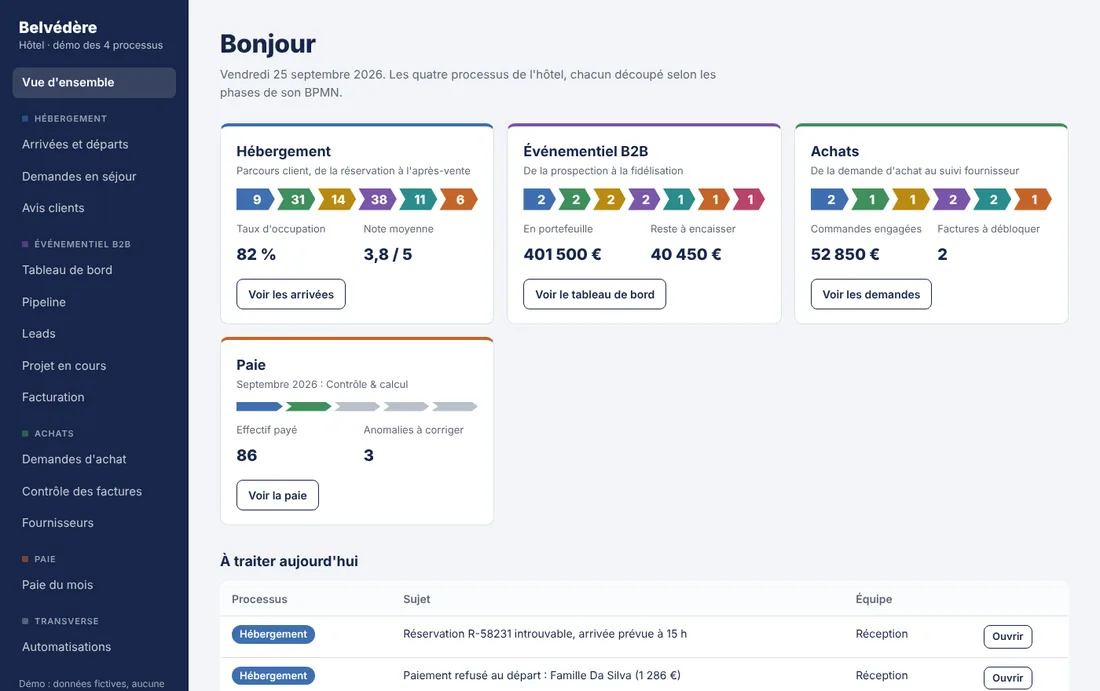
A hotel with its 4 main processes automated

To show what this changes day to day, here is a fictitious hotel whose four main processes are tracked in a single tool: the guest journey, B2B events, purchasing and payroll. Each team sees where its files stand, and the repetitive exchanges between teams are handled by automated scenarios.

You can browse the demonstration: it is interactive, the data is fictitious and nothing is saved. Please note that the demonstration is in French.

Interactive demo (in French) Step into the Belvédère hotel's software Browse the screens as if you were the hotel team: bookings, events, purchasing, payroll and automated scenarios. Click, explore, nothing is saved. Launch the demonstration (demo in French) Opens in a new tab · no sign-up · the demo is in French
4
processes tracked
26
automated scenarios
17
screens to explore
0
re-keying between teams

Guest journey

From booking to after-sales follow-up

Booking · Pre-stay · Arrival · Stay · Departure · After-sales

The guest, the booking channels, the information system, reception, internal services and customer relations all work together. The automations send the confirmation, the reminder and the personalised offer before arrival, prepare the rooms, pass requests to the right department, issue the receipt at departure and ask the guest for a review.

7 automated scenarios
ScenarioTriggered
Booking confirmed → email + practical informationNew booking
D-3 reminder + personalised offer (upsell)Every day at 10 a.m.
Day before arrival → housekeeping and maintenance tasksEvery day at 6 p.m.
Guest request → ticket to the right departmentApp, phone, front desk
Check-out → receipt and invoice by emailStay closed
Satisfaction survey D+1Day after departure
Review ≤ 3/5 → alert to Customer relationsNew review (Google, booking platforms)

B2B events

From prospecting to loyalty

Prospecting · Need · Proposal · Contract · Event day · Invoicing · Loyalty

Seminars, conferences, corporate meals: the full life cycle of an event project, from lead qualification (budget, authority, need, timing) to customer loyalty. Sales, marketing, operations and finance are coordinated, and the client receives logistics reminders at the right moments.

7 automated scenarios
ScenarioTriggered
New lead → CRM record + alert to salesWebsite form, email, LinkedIn
Follow-up on unanswered proposal (D+5)Every day at 9 a.m.
Proposal accepted → contract + depositPhase change
Logistics reminders D-21 / D-7 / D-1Every day at 8 a.m.
NPS satisfaction survey (D+1)End of event
Payment reminder (D+7, D+15, D+30)Due date passed
Loyal client: proposal at 10 monthsEvery Monday

Purchasing

From purchase request to supplier follow-up

Need · Consultation · Negotiation · Order and receipt · Payment · Evaluation

Each need becomes a validated purchase request, put out to competitive tender, ordered, received and then paid. Matching the invoice against the order and the goods receipt automatically blocks discrepancies, and suppliers are evaluated every quarter.

6 automated scenarios
ScenarioTriggered
Purchase request created → manager approval + budget checkNew request
Request approved → call for tenders to suppliersRequest approved
Supplier follow-up if no reply (D+3)Every day at 9 a.m.
Invoice received → order / receipt matchingDedicated invoice email address
Non-conformity → supplier notification + credit noteDelivery rejected
Quarterly supplier evaluationFirst day of the quarter

Payroll

From the need to performance analysis, with end-to-end payroll

Planning · Selection · Contract · Execution · Payroll · Payment · Improvement

Payroll is prepared from schedules and time clock records: variable items, checking for anomalies before calculation, payslip approval, bank transfers, accounting entries and social security filings. Every step is traced, with a clear separation of responsibilities and GDPR compliance.

6 automated scenarios
ScenarioTriggered
Time clock + schedule → variable itemsEvery day at 11 p.m.
Variables closed → anomaly alert to managersOn the 25th of each month
Payslips approved → employee vault + notificationManagement approval
SEPA transfer file generationPayslips approved
Payroll entries → accountingAfter transfer
Monthly HR reporting (headcount, overtime, absences)On the 5th of each month

See all the scenarios in the demonstration → (demo in French)

Is your sector not hospitality? The approach is the same: identify the repetitive exchanges between teams, then hand them over to agents, keeping human validation on sensitive actions.

Let's talk about your project

A demonstration based on your website, your competitors or your processes.

Contact us → Book a 20-minute call